
Add a Project Tracker to any website
 Airtable
 Google Sheets
 Notion
 Stackby
 SmartSuite
 Excel
Excel Teable
 NocodeBackend
 AITable
 Trello
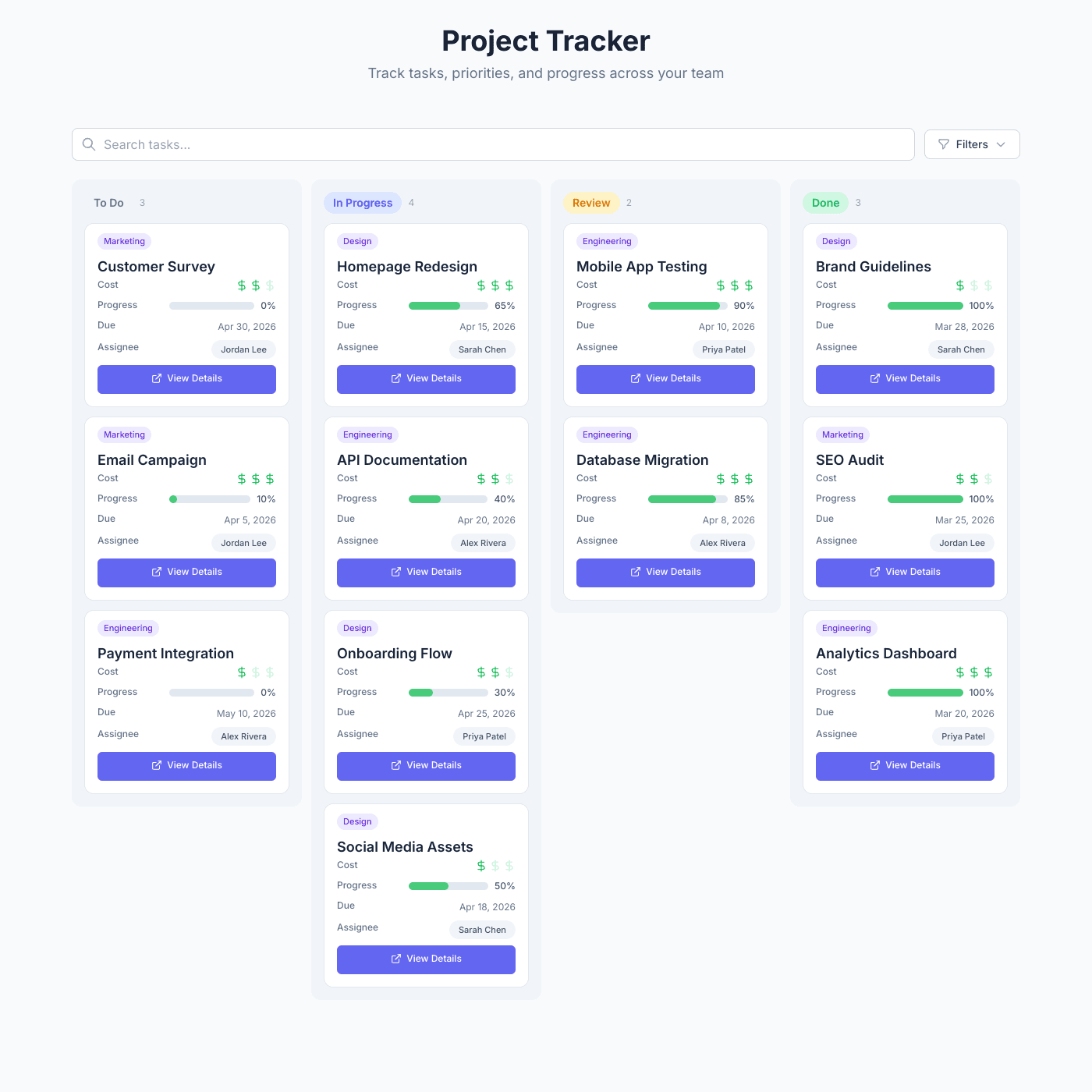
Display tasks, priorities, and progress in a beautiful kanban board powered by your Airtable or Google Sheets data. Embed anywhere in minutes.
Works with all website builders, e-commerce platforms, and websites.
 Weebly
 UnbounceBigCommerceMagentoJoomlaDrupalHubSpotWooCommerceGhostBloggerGoDaddy
 CarrdHTML
Create your Project Tracker Widget
Configure your widget and add it to your website for free!
Shareables Project Tracker Widget displays tasks, priorities, and progress on any website as a kanban board, powered by Airtable or Google Sheets. Update your spreadsheet and the board refreshes automatically — no coding or project management tool required.
Why teams love the Project Tracker Widget
Keep your team aligned and stakeholders informed.
Use Airtable or Google Sheets as Your Task Manager
No need to learn a new project management tool. Connect your existing Airtable base or Google Sheet and your kanban board is ready. Add tasks, update statuses, and track progress from the spreadsheet you already use. Changes appear on your board instantly.
AirtableGoogle SheetsNotion StackbySmartSuiteExcelTeableNocodeBackendAITableTrello
See Where Every Task Stands at a Glance
Kanban columns show task status clearly — To Do, In Progress, Review, Done. Progress bars, priority ratings, and budget tracking give you a complete picture without opening individual tasks. Perfect for standups, client updates, and stakeholder reporting.
Match Your Brand and Workflow
Customize every detail — colors, fonts, fields, and layout. Show the information that matters most with rating stars, progress bars, checkboxes, date fields, and budget numbers. Choose which columns to display and how they appear on each card.
Always Up to Date
Update a task in your spreadsheet and the board updates instantly. No manual refreshing, no delays. Your team and stakeholders always see the latest status, priorities, and progress without switching between tools.
Embed on Any Website or Intranet
Works with any website builder including Webflow, Squarespace, WordPress, Wix, Notion, and more. Embed your project board on internal wikis, client portals, or team dashboards. Responsive design looks great on any device.
Frequently Asked Questions
A project tracker widget is an embeddable kanban board that displays your tasks and projects directly on any website. It pulls data from Airtable or Google Sheets and renders it as a beautiful, interactive board with status columns, priority ratings, progress bars, and more.
Spreadsheets give you full control over your data without vendor lock-in. There's no learning curve, you can customize columns however you want, and you can share the board externally by embedding it on any website — something traditional project management tools don't offer.
Connect your Airtable or Google Sheet, customize the board layout and styling, then copy the embed code to your website. The whole process takes about 10 minutes.
No coding required. Our visual editor lets you customize everything from column layouts and card fields to fonts, colors, and spacing without writing any code.
Our project tracker widget works with any website that supports embed codes, including Webflow, Squarespace, WordPress, Wix, Notion, Framer, Carrd, and custom HTML sites.
Yes. You can add any combination of text, ratings, progress bars, dates, numbers, checkboxes, and badges to your cards. Each field type has its own styling options including icons, colors, and layout positions.
Your project board automatically syncs with your Airtable or Google Sheet in real-time. When you update a task status, change a priority, or add a new task in your spreadsheet, it appears on the board within seconds.
Absolutely. Many teams embed the project tracker on client portals or project pages so clients can see progress in real-time without needing access to internal tools.
Yes. The widget supports search, category filters, and sorting. Users can quickly find specific tasks or filter by priority, assignee, category, or any other field.
Yes, the board automatically adapts to different screen sizes. On mobile, kanban columns stack vertically for easy scrolling and task viewing.
Yes. Pro and Business plans include custom domain support so you can host your project board on your own domain with free SSL included.
Yes, you can get started for free with our free tier. It includes core features with a small "Powered by" badge. Upgrade to remove branding and unlock advanced features like custom domains.
You can display text, ratings (with custom icons like stars or dollar signs), progress bars, dates, numbers with prefixes/suffixes, checkboxes, badges, and more. Each field type is fully customizable.
Yes. The kanban board can be grouped by any column in your data — status, priority, assignee, category, or any custom field. You can also customize the column order and colors.
More Widgets
Blog Widget
Create a beautiful, fully customizable blog widget powered by your Airtable or Google Sheets data. Embed anywhere in minutes.
Chart Widget
Turn your Airtable or Google Sheets data into beautiful, interactive charts. Bar, line, pie, area, and more. Embed on any website in minutes.
Card Widget
Create beautiful, fully customizable card grids powered by your Airtable or Google Sheets data. Embed anywhere in minutes.